Water Creature: Avoiding Design Pitfalls with This Whimsical Font
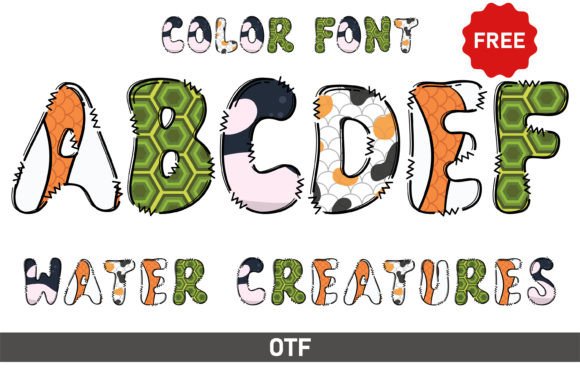
The Water Creature font captures a sense of fluidity and playfulness that can instantly elevate a creative project. Its unique, character-driven style is perfect for designs aiming to convey an artistic or whimsical feel. You see it used effectively in children’s books, where its easy-to-read shapes create an engaging experience, as well as on posters, party invitations, and greeting cards that need a touch of personality. However, the very features that make Water Creature so appealing can also lead to significant technical and design errors if you aren't careful. Understanding its quirks is the key to using it effectively.
The Critical Compatibility Trap: Not All Files Work Everywhere
One of the most common and frustrating mistakes users make is assuming all font files are universal. This is especially true for modern, feature-rich fonts like Water Creature. A major point of confusion is the difference between its black (standard) and color versions. While the standard black version is highly compatible and works seamlessly in Cricut Design Space and other cutting machine software, the color version is a different beast entirely.
The color font files (often in OTF or TTF format) are not compatible with Cricut. Attempting to use them will result in errors or the machine simply not recognizing the font. This oversight can halt a crafting project, waste time, and cause unnecessary frustration. The color version is designed for advanced design programs that support OpenType-SVG color font technology, such as Adobe Photoshop, Adobe Illustrator, Silhouette Studio Designer Edition, and Inkscape.
A Better Approach to Font Selection
Before you download or purchase Water Creature, ask yourself two questions:
- What is my primary design tool? If you are a Cricut user, you can confidently use the black version for all your cut files. If you want to create full-color graphics for print or digital use, ensure you have access to a compatible program like Photoshop or Illustrator before investing in the color version.
- What is the final output? For cutting vinyl or cardstock, the black version is your tool. For a vibrant, multicolored illustration on a t-shirt mockup or a digital invitation, the color version shines.
Always check the font’s compatibility notes provided by the creator. A quick review of the Ultimate Font Guide or product description can save you from purchasing a file you cannot use. This simple step ensures your investment in Water Creature translates directly into usable design assets.
Overlooking Design Context and Legibility
Another frequent misstep is using Water Creature in contexts where its charm becomes a hindrance. Its artistic, flowing style is not suited for every purpose. Using it for long paragraphs of body text, for instance, would severely impact readability and tire the reader's eye. Similarly, placing it on a busy, colorful background can make the text disappear, defeating its purpose entirely.
The mistake here is prioritizing aesthetic appeal over function. A beautifully styled font loses all its value if the message it carries is unclear. This can affect communication, professionalism, and the overall quality of your presentation.
Practical Advice for Effective Application
Use Water Creature strategically to maximize its impact:
- Headlines and Titles: It excels as a focal point for headings, logos, or single-word accents where its personality can be fully appreciated.
- Pairing with Simpler Fonts: Combine it with a clean, legible sans-serif or serif font for body text. This creates a balanced hierarchy that is both engaging and easy to read.
- Contrast is Key: Place the font on a simple, solid-color background or a subtle texture. High contrast ensures the letterforms stand out. If using the color version, test it against both light and dark backgrounds to see which combination looks best.
- Scale Matters: Use it at a larger size. Intricate fonts often lose detail and become muddy when scaled down too small.
For example, a children's book cover might use Water Creature for the title in a bright, contrasting color, while the author's name and back-cover blurb use a simple, friendly sans-serif. This guides the reader's eye and maintains clarity.
Ignoring Licensing and Usage Rights
A less technical but equally important oversight is failing to understand the font's licensing. Water Creature, like all digital fonts, comes with a license that dictates how it can be used. A common mistake is assuming a single purchase allows for unlimited commercial use across all projects and for all clients. This is rarely the case.
Using a font in a way that violates its license can lead to legal issues, financial penalties, and damage to your professional reputation. This is particularly crucial for freelancers, small business owners, and marketers who create assets for clients.
How to Ensure Proper Use
Treat the font license as a essential part of the product. Before starting a project:
- Read the EULA (End-User License Agreement): It will specify if the license is for personal use, commercial use, or both. It may also limit the number of users or computers on which the font can be installed.
- Understand Project Scope: If you're creating a logo for a client, ensure the license permits embedding the font in a final logo file or converting it to outlines. If you're creating products for sale (like t-shirts or mugs), confirm the license allows for this type of commercial use.
- Keep Records: Save your purchase receipt and a copy of the license agreement. This is your proof of lawful use.
By being proactive about licensing, you protect yourself and your clients, ensuring your creative work built with Water Creature is both beautiful and legally sound.
Making an Informed Decision with Water Creature
Choosing Water Creature is about more than just liking its look. It's about understanding its capabilities and constraints. Before you click "buy" or "download," take a moment to evaluate your needs. Review the technical specifications, consider the context of your projects, and clarify the licensing terms.
When used with intention, Water Creature is a powerful tool for adding joy and artistry to your designs. It can make a child's birthday invitation feel magical or a poster pop with creative energy. The key is to approach it not just as a decorative element, but as a functional component of your design system. By avoiding the common pitfalls related to compatibility, context, and licensing, you ensure that this whimsical font helps you achieve professional, engaging, and hassle-free results every time.