Designing with Dolce Vita: A Practical Guide to Elevating Your Typography
In the crowded landscape of digital design, typography is often the silent narrator of your brand’s story. While many designers default to standard system fonts or overused web fonts, there is a distinct advantage in seeking out typefaces that offer both personality and utility. Dolce Vita is one such typeface that has been capturing the attention of creatives across the industry. Marketed as a capital font made for designers by designers, Dolce Vita promises to add a unique "spice" to your projects. However, understanding how to properly integrate a specialized font like this into your workflow is just as important as the font itself.
Understanding the Essence of Dolce Vita
At its core, Dolce Vita is a display typeface designed to command attention. It is not merely a collection of letters; it is a stylistic statement intended for specific use cases. The font excels in scenarios where you need to establish a strong visual hierarchy immediately. Whether you are crafting a logo, designing a hero section for a website, or creating bold marketing collateral, this typeface offers a solution that feels both exotic and professional.
The design community often struggles to find fonts that bridge the gap between "artistic flair" and "commercial viability." Dolce Vita attempts to fill this gap. It is constructed to serve various design needs, but its primary strength lies in its ability to act as a focal point. It is the type of font that can transform a mundane header into a memorable brand mark. However, because it carries such a distinct aesthetic, it requires a thoughtful approach to application.
Avoiding the "One-Font-Fits-All" Trap
One of the most common mistakes beginners and even seasoned professionals make is treating display fonts as workhorses. Because Dolce Vita is described as being ready for "logos, body types, or anything in between," there is a temptation to use it for everything. This is a trap that can lead to visual fatigue and poor readability.
While the font is versatile, using it for long paragraphs of body text is generally not recommended. Display fonts are optimized for impact at larger sizes. When scaled down to 12px or 14px for reading text, the intricate details of a font like Dolce Vita can become cluttered, making it difficult for users to scan content quickly. This affects the usability of your site and can increase bounce rates as visitors struggle to read your message.
The Better Approach: Use Dolce Vita strategically. Reserve it for your H1 and H2 headings, logos, and call-to-action buttons. For body text, pair it with a highly legible sans-serif or serif font that complements its style without competing for attention. For example, if you choose the Light weight of Dolce Vita for a header, a clean sans-serif like Roboto or Open Sans for the body creates a balanced, professional look.
Mastering the Three Weights: Light, Normal, and Bold
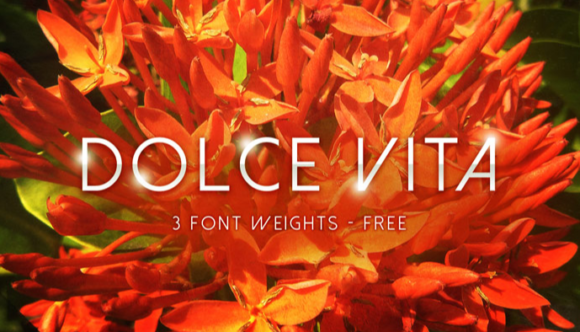
Dolce Vita comes equipped with three distinct weights: Light, Normal, and Bold. A frequent oversight is failing to understand the specific utility of each weight. Many designers simply reach for "Bold" whenever they want to emphasize text, but this can lead to a heavy, clunky design if not managed correctly.
- Light: This weight is excellent for creating an airy, elegant, or luxurious feel. It works beautifully for fashion blogs, boutique branding, or wedding invitations. However, be cautious with color contrast. Light fonts on light backgrounds can disappear, creating accessibility issues.
- Normal: The standard weight is your baseline. It provides the clearest representation of the font’s intended style. Use this when you want the font's personality to shine without the added visual weight of the bold version.
- Bold: Use this weight sparingly for maximum impact. It is ideal for short, punchy statements or navigation menus. If you overuse the Bold weight, you dilute its power, and your design may look aggressive rather than assertive.
Compatibility and Technical Considerations
Before committing to Dolce Vita for a large-scale project, you must verify its technical compatibility. A common pitfall is designing a beautiful mockup only to find that the font file does not support the character set you need, or that it renders poorly on specific operating systems.
When evaluating the font, check for the following:
- Character Support: Does the font support multiple languages if you are targeting an international audience? Does it include the special characters or symbols required for your specific niche?
- File Formats: Ensure you have the correct file formats (WOFF, WOFF2 for web; OTF or TTF for desktop) to ensure smooth loading times and crisp rendering.
- Rendering Quality: Test the font on different browsers and devices. Some decorative fonts can appear jagged or pixelated on Windows machines if they lack proper hinting.
By conducting these checks early, you avoid the frustration of last-minute redesigns and ensure that your final product maintains its intended quality across all platforms.
Context is King: Matching Font to Brand Voice
Finally, the most significant error in using a typeface like Dolce Vita is ignoring the context of your brand. Typography communicates emotion. Dolce Vita has a specific "vibe"—it suggests creativity, flair, and perhaps a touch of the exotic. If you are designing for a corporate law firm or a medical institution, this font might send the wrong message, potentially undermining the trust you are trying to build.
Conversely, for a creative agency, a travel blog, or a lifestyle brand, it could be the perfect differentiator. The key is to align the font's personality with your brand's values. Ask yourself: Does this font help tell my story, or is it just decoration?
By approaching Dolce Vita with a clear strategy—understanding its weights, pairing it wisely, and checking technical specs—you can leverage its unique design to create truly standout visuals. It is a tool for those who want to move beyond the mundane, provided they use it with intention and care.