Unlocking Creativity with Polka: A Designer's Guide to the Handwritten Script Font
In the vast landscape of digital typography, finding a font that bridges the gap between professional elegance and casual warmth can feel like a daunting task. Enter Polka, a modern and playful handwritten script font that has captured the attention of crafters, graphic designers, and entrepreneurs alike. Created by the reputable Kong Font Studio, Polka offers a distinct personality that can breathe life into creative projects ranging from wedding invitations to branding materials. However, simply downloading a font and typing out words is rarely enough to achieve a polished result. To truly harness the potential of Polka, one must understand the nuances of script typography and the common pitfalls that can turn a charming design into a chaotic mess.
The Allure of the Handwritten Aesthetic
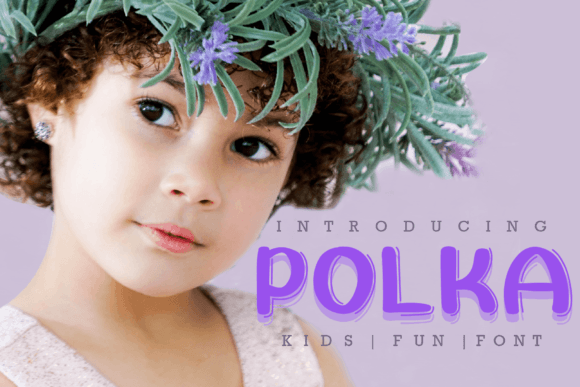
Polka is not just another script font; it is a specific tool designed for specific emotional responses. Its "playfulness" is its defining characteristic, making it ideal for projects that require a human touch without the illegibility of true cursive handwriting. For small business owners, using Polka on packaging or social media graphics can instantly soften a brand’s image, making it feel more approachable to consumers. For educators and bloggers, it serves as an excellent accent font to highlight quotes or key takeaways, breaking the monotony of standard serif or sans-serif body text.
However, the allure of this aesthetic often leads to the first major mistake: misunderstanding the font's primary function. Many beginners treat a display or script font like Polka as a workhorse font, attempting to use it for long paragraphs or extensive body copy. This is a critical error. Because Polka features connecting strokes and varied baseline heights inherent to its handwritten style, it becomes difficult to read in dense blocks of text. The eye struggles to track lines of continuous script, leading to reader fatigue and a drop in engagement. The result is a design that looks amateurish rather than artistic. The better approach is to reserve Polka for headlines, sub-headers, and short, impactful statements where its personality can shine without overwhelming the viewer.
Compatibility and Technical Integration
One of Polka’s strongest selling points is its compatibility with industry-standard tools like Photoshop and Silhouette Design Studio. This versatility allows it to move seamlessly between digital design and physical crafting. However, a frequent oversight occurs when users fail to check how the font renders across different platforms. A design that looks stunning in Adobe Photoshop might not translate perfectly to a Cricut or Silhouette cutting machine if the user is unaware of how the software interprets vector paths.
A common technical error involves ignoring kerning and ligatures. While modern fonts often come with built-in kerning pairs (adjustments to the space between specific character pairs), software like Silhouette Studio sometimes requires manual intervention. Beginners often type out a word in Polka and notice awkward gaps between letters like 'T' and 'o' or 'W' and 'a'. Instead of manually adjusting the letter spacing (kerning), they leave the text as is, resulting in a disjointed appearance that breaks the "handwritten" illusion. To correct this, users must familiarize themselves with the character spacing tools in their design software. A slight overlap of letters is often necessary to mimic natural handwriting, but care must be taken not to merge strokes in a way that makes the letters unrecognizable.
The Pitfall of Poor Contrast and Hierarchy
When incorporating Polka into a layout, many creators struggle with visual hierarchy. Because Polka is decorative and has a high personality quotient, it demands a counterpart that is neutral and easy to read. A frequent mistake is pairing Polka with another decorative font or a script font that is slightly different but equally loud. This creates visual competition, where the viewer doesn't know where to look first.
Imagine a wedding invitation where "Save the Date" is written in Polka, but the location details are written in another cursive font. The result is chaotic and stressful to read. The corrective advice here is the principle of contrast. If Polka is your headline font, pair it with a clean, geometric sans-serif like Montserrat or a classic serif like Garamond for the body text. This creates a rhythm that guides the eye naturally. Polka captures the emotion, while the secondary font delivers the information. This balance ensures that the design is both beautiful and functional.
Evaluating Quality and Licensing
Before committing to Polka for a commercial project, it is vital to address the often-overlooked details of font licensing and file quality. While Kong Font Studio is known for quality production, users downloading fonts from various marketplaces must ensure they are obtaining the correct license for their intended use. A common mistake is assuming that a "free for personal use" license covers a logo for an Etsy shop or a t-shirt design intended for sale. Using a font without the proper commercial license can lead to legal complications and financial penalties down the road.
Furthermore, users should evaluate the technical quality of the font file. High-quality fonts like Polka typically include multiple file formats (OTF, TTF) and may include PUA (Private Use Areas) encoded characters. If a user finds that they cannot access special swashes or alternate characters (like a fancy tail on a 'y' or 'g'), it is often because they are not utilizing the Glyphs panel in their software or the font lacks these features. Before starting a large project, type out the entire alphabet and special characters to test the font's consistency. Look for smooth curves and consistent stroke weight. If the lines appear jagged or the spacing is wildly inconsistent, the font file may be poorly optimized, which will ruin the final print quality.
Practical Application in Crafting and Branding
For those using Polka in the crafting space, specifically with vinyl cutting, a unique challenge arises with thin strokes. Handwritten fonts often feature delicate, thin connecting lines. When cutting these out of vinyl, if the design is scaled down too small, the vinyl cutter may struggle to cut these fine details cleanly, leading to tearing during the weeding process.
A better approach is to test cut a small section of your design before committing to a full run. If the thin connecting strokes of Polka are ripping, consider scaling the design up or using a "bold" version of the font if available. Alternatively, when using Polka for heat transfer vinyl (HTV) on apparel, consider the fabric texture. A highly textured fabric like burlap or heavy canvas can swallow the delicate details of a script font. In these cases, a bolder, more blocky font might be more appropriate, or Polka should be used at a larger scale to ensure legibility.
Conclusion: Making an Informed Choice
Polka by Kong Font Studio is a versatile and charming addition to any designer’s toolkit, offering a playful yet professional handwritten aesthetic. However, its effectiveness relies entirely on the user's ability to apply it correctly. By avoiding the common mistakes of poor pairing, ignoring technical kerning settings, misunderstanding licensing, and overlooking the medium of application, you can elevate your work from amateur scrapbooking to professional graphic design.
Treat Polka not just as a set of letters, but as a design element with specific strengths and limitations. Use it to evoke emotion, draw attention, and add flair, but always ensure that your message remains the priority. With thoughtful application and a keen eye for detail, Polka can help you create projects that are not only visually stunning but also clear, professional, and effective.