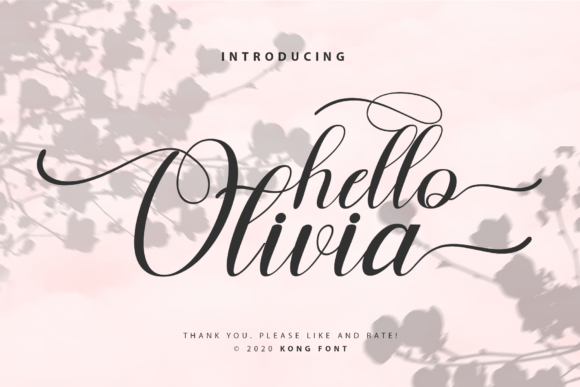
Hello Olivia: How to Use This Playful Script Font Without the Pitfalls
Finding the right typeface can feel like searching for a needle in a haystack. You want something that looks professional yet personal, trendy yet timeless. Enter Hello Olivia, a modern and playful script font designed to bridge the gap between casual charm and professional utility. Created by the reputable Kong Font Studio, this typeface has become a favorite among digital creators, but like any powerful tool, it requires a bit of know-how to master. If you are a crafter, designer, or entrepreneur looking to add a touch of elegance to your work, understanding how to navigate the common mistakes associated with script fonts is essential.
Understanding the Appeal of Modern Script Typography
Before diving into the technicalities, it helps to understand why fonts like Hello Olivia are so popular. In a digital landscape saturated with rigid sans-serifs and predictable serifs, script fonts offer a human touch. They mimic the fluidity of handwritten text, which psychologically signals authenticity and warmth to the viewer. For small business owners and marketers, this is gold. It allows you to communicate a brand personality that feels approachable rather than corporate.
However, the "playfulness" of Hello Olivia is often where beginners make their first mistake. Many assume that because a font looks casual, it can be used anywhere. This is a misconception that can dilute your brand’s message. The goal is to use the font to enhance readability and aesthetic appeal, not to distract from the content. When you download this asset from platforms like Creative Fabrica, you aren't just buying letters; you are buying a specific visual voice that needs to be used in the right context.
Avoiding the "Wedding Invite" Trap
One of the most common errors with script typefaces is overuse. It is tempting to set your entire website or brochure in Hello Olivia because you love the way the swirls look. However, script fonts are notoriously difficult to read in long-form body text. They are designed for impact, not for paragraphs.
Imagine receiving a business contract written entirely in cursive. It would be frustrating to read and likely unprofessional. The same applies to your design projects. If you are using Hello Olivia for a logo, a social media quote, or a header, it shines. But if you try to force it into the fine print or the body of an email, you risk alienating your audience.
The Better Approach: Treat Hello Olivia as the headline artist, not the stagehand. Pair it with a clean, legible sans-serif font like Montserrat or Open Sans for the smaller text. This contrast creates a visual hierarchy that guides the reader’s eye naturally, ensuring your message is communicated clearly while maintaining that playful aesthetic.
Compatibility and Workflow: The Silhouette & Photoshop Reality
Technical compatibility is a silent killer of creativity. You might find the perfect design, only to spend hours troubleshooting why the font isn't appearing in your software. Hello Olivia is noted for its compatibility with tools like Photoshop and Silhouette Design Studio, but "compatible" doesn't always mean "plug-and-play."
A frequent oversight is neglecting to restart your design software after installation. Fonts are system-level resources; programs like Silhouette Studio or Adobe Photoshop load their font lists upon startup. If you install Hello Olivia while the program is open, you likely won't see it until you reboot the software. This leads many to think the file is corrupt or incompatible.
Furthermore, for those using cutting machines, vectorization is key. While Hello Olivia is designed with crafting in mind, some script fonts have intricate connections that can confuse a cutting blade if not properly welded. If you are using this for vinyl decals or paper crafting, ensure you are welding the text in your design software to create a single cut path rather than individual letters. This prevents the machine from cutting over the same spot multiple times and ruining your material.
Evaluating Legibility and Letter Spacing
When evaluating any font, including Hello Olivia, you must look beyond the individual letters and see how they interact. A common mistake is failing to adjust kerning (the space between letters). Script fonts are designed to connect, but depending on the letter combination, gaps can appear, or letters can crash into one another.
For example, if you type "Hello," the connection between the 'l' and 'o' might look perfect. But if you type "Wavy," the connection point might look awkward. As an experienced designer, you should never treat font spacing as "set it and forget it." Always inspect your text at the final output size.
Practical Tip: Zoom in on your text at 200% or 300%. Look for uneven spacing or broken connections. In software like Photoshop, you can manually adjust the tracking and kerning to ensure the flow of Hello Olivia remains smooth and unbroken. This small adjustment can be the difference between a design that looks amateur and one that looks professionally crafted.
Licensing and Usage: Protecting Your Business
This is a critical area where many entrepreneurs and freelancers cut corners, often unintentionally. When you acquire Hello Olivia from a source like Creative Fabrica, you must understand the licensing terms. A personal use license is often cheaper or included in subscriptions, but it strictly prohibits use in products you sell or in commercial branding.
Using a font commercially without the proper license is a legal risk that can lead to hefty fines or takedown notices later. If you are designing a t-shirt to sell, a logo for a client, or marketing materials for your business, you must ensure you have the commercial license.
Don't Assume: Just because you bought a subscription to a design site doesn't mean every font is covered for commercial use. Always check the specific license for Hello Olivia. It is better to spend a few extra dollars on the correct license than to face legal headaches down the road. Kong Font Studio, like most foundaries, protects their intellectual property, and respecting those boundaries is part of being a professional creator.
Final Checks Before You Print or Publish
Before you hit "print" or "publish," run through a quick checklist to ensure Hello Olivia is working for you, not against you.
- Context Check: Is the font being used for a headline or accent, or is it buried in body text? Move it to a prominent position if it's getting lost.
- Scale Check: Does it look good small? Script fonts can lose detail at very small sizes. If it becomes a blob, increase the size or choose a simpler font for that specific element.
- Color Contrast: Playful fonts can sometimes look "thin." Ensure there is enough contrast between the font color and the background to ensure readability.
Hello Olivia