Mocha Cherry: Integrating a Playful Display Font into Professional Workflows
In the landscape of modern design, typography is rarely just about selecting a pretty typeface; it is a strategic decision that influences user perception, brand voice, and project cohesion. Mocha Cherry, a fun and playful display font created by Allouse Studio, offers a specific aesthetic that can be incredibly powerful when deployed with intention. However, leveraging a font with such a distinct personality requires more than a simple drag-and-drop. To truly benefit from this asset, professionals—from graphic designers to marketing managers—must understand how to integrate it into their planning, execution, and quality control phases. This article explores the practical application of Mocha Cherry, detailing how to move beyond the novelty of its warm, childish appearance to create consistent, high-quality outcomes.
Understanding the Asset: Beyond the Aesthetic
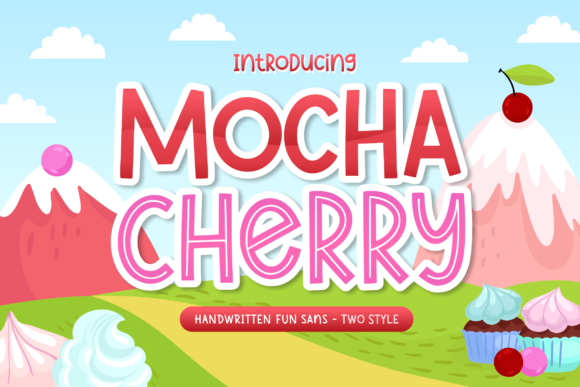
Before purchasing or downloading Mocha Cherry, it is essential to conduct a rapid assessment of its technical and aesthetic compatibility with your current project pipeline. Allouse Studio designed this font to evoke warmth and playfulness, characterized by rounded edges and a handwritten or brush-like flow. In a professional workflow, this categorizes Mocha Cherry as a display font—meaning it is intended for headers, logos, and short bursts of attention-grabbing text, rather than long-form body copy.
The preparation phase involves checking licensing agreements to ensure the font covers your intended use case, whether that is digital advertising, merchandise, or client deliverables. Furthermore, you should test the font's file format (OTF, TTF, or WOFF) against your primary software environment, such as Adobe Creative Cloud, Affinity Suite, or Canva. By verifying these technical details early, you prevent workflow bottlenecks later in the production cycle.
Strategic Planning and Mood Boarding
Integrating Mocha Cherry begins in the conceptualization stage. If you are working on a branding project for a bakery, a daycare, or a children’s educational app, this font should be introduced during the mood boarding process. It is not enough to simply like the font; it must serve the narrative. When building your mood board, pair Mocha Cherry with complementary assets. Because the font has a "childish" or warm vibe, it pairs well with earthy color palettes, pastel gradients, or organic textures like paper and wood.
During the planning meeting with stakeholders or clients, present Mocha Cherry not just as a typeface, but as a voice. Explain that using this font sets a specific tone—approachable, informal, and friendly. This aligns the client’s expectations with the visual output, reducing the likelihood of revisions later. By establishing the font's role early, you create a clear roadmap for its implementation.
Implementation: Execution in Design Software
Once the project moves into the execution phase, the usage of Mocha Cherry must be disciplined. A common mistake when using decorative fonts is over-application. Because Mocha Cherry has high visual interest, using it for an entire paragraph can make text illegible and overwhelming. The practical implementation rule is to use it for impact.
Use Mocha Cherry for H1 headers on posters, the main text on social media graphics, or the logo lockup for a brand. For example, if you are designing a menu for a coffee shop, use Mocha Cherry for the section headers like "Sweet Treats" or "Hot Drinks," but switch to a clean sans-serif font for the item descriptions and prices. This hierarchy ensures readability while maintaining the warm aesthetic.
Workflow Integration and Asset Management
For freelancers and agencies managing multiple projects, organization is key. Once you have licensed Mocha Cherry, upload it to your digital asset management (DAM) system or local font manager (like FontBase or RightFont). Tag it with keywords such as "Playful," "Display," "Handwritten," and "Allouse Studio." This saves time during the asset retrieval phase of future projects.
When working within team environments, ensure that the font license allows for multiple installations if necessary. If you are handing off files to a printer or another designer, outline the font usage in your style guide. Include a note that Mocha Cherry is the designated display font and provide the source link. This standardization prevents the "missing font" error that can derail production timelines.
Quality Control and Compatibility Testing
Quality control is where the professional separates from the hobbyist. Mocha Cherry, like many script or display fonts, may have specific kerning (spacing between characters) that looks different across various software. Before finalizing a design, you must test the font in the specific environment where it will be consumed.
If you are using Mocha Cherry for a website header, you need to convert it to a web-optimized format (WOFF2) and test it across browsers like Chrome, Safari, and Firefox. Check how the font renders on mobile devices; sometimes, playful fonts can appear too small or lose their charm on small screens. If the font is for print, print a test strip to ensure the curves of the letters reproduce cleanly without pixelation or ink bleed, which can sometimes affect thin, handwritten-style strokes.
Scalability and Long-Term Use
Consider the scalability of using Mocha Cherry. If you are building a brand identity system, document exactly how the font should be scaled. For instance, define that the minimum size for Mocha Cherry is 24pt to maintain legibility. By creating these rules, you ensure that as the brand grows and new assets are created by different team members, the use of Mocha Cherry remains consistent.
Furthermore, think about the longevity of the trend. While the "warm and childish" look is currently popular, trends shift. A robust workflow includes a contingency plan. In your design files, keep the text editable (live text) rather than rasterized for as long as possible. This allows you to swap Mocha Cherry for a different display font in the future if the brand evolves, without having to rebuild the entire layout.
Practical Use Cases and Scenarios
To illustrate the versatility of this font, consider a few distinct workflow scenarios:
- Educational Materials: An educator creating worksheets for kindergarten students can use Mocha Cherry for instructions. The childish appearance makes the content less intimidating for young learners, while the clear letterforms ensure they can recognize the shapes of the letters.
- Product Packaging: A small business owner selling artisanal hot cocoa might use Mocha Cherry on the front of the packaging. The "mocha" association in the name and the warm style align perfectly with the product. Here, the font is part of the tactile experience, working alongside the physical material of the label.
- Social Media Marketing: A marketer creating an Instagram story for a flash sale can use Mocha Cherry to highlight the discount percentage. The playful nature of the font encourages a "fun" shopping experience, potentially increasing engagement compared to a standard corporate font.
Conclusion
Mocha Cherry by Allouse Studio is more than just a download; it is a tool that, when used correctly, can significantly elevate the emotional resonance of a project. By integrating it thoughtfully into the planning phase, executing with a focus on hierarchy, and rigorously testing for compatibility, professionals can harness its warm, playful energy without sacrificing quality or workflow efficiency. Whether you are designing for print, digital, or educational contexts, the key lies in balancing the font's personality with the functional requirements of your deliverable.