Integrating the Gingerbread Cookies Aesthetic into Your Design Workflow
In the realm of graphic design, typography is not merely about legibility; it is a fundamental component of the user experience. When a project calls for a specific emotional resonance—specifically one that is playful, artistic, or nostalgic—the choice of font dictates the entire visual hierarchy. The "Gingerbread Cookies" font family serves as a prime example of this principle. It is a specialized typeface designed to evoke the warmth and whimsy associated with handwritten confectionery art. However, to utilize such a specialized asset effectively, one must understand its technical constraints and integrate it thoughtfully into a broader creative workflow.
This article explores the practical application of whimsical typefaces like Gingerbread Cookies, moving beyond simple aesthetics to address workflow compatibility, technical limitations, and strategic implementation for professionals, educators, and hobbyists alike.
The Role of Whimsical Typography in Modern Projects
Fonts that convey a playful or artistic feel are critical in specific market verticals. They are the standard for designs aiming to engage younger audiences or evoke a sense of handmade craftsmanship. Common applications include:
- Children’s Education: Creating books, worksheets, and posters that are colorful and easy to read, fostering an engaging experience for early learners.
- Event Management: Designing invitations and greeting cards where the typography itself acts as a decorative element.
- Small Business Branding: Establishing a "homemade" or artisanal brand identity for bakeries, craft stores, or boutique shops.
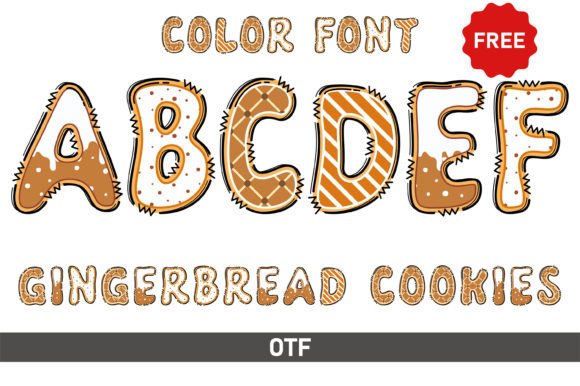
The Gingerbread Cookies font fits perfectly into this niche. Its design mimics the icing work found on holiday treats, making it an ideal asset for seasonal campaigns or year-round branding that requires a touch of sweetness. However, selecting the font is only the first step in the process.
Technical Compatibility and Workflow Integration
A common pitfall in the creative process is the disconnect between design aspirations and technical capabilities. When integrating a decorative font like Gingerbread Cookies into your workflow, you must first identify the end-use environment. The font typically comes in two distinct variations: a standard black version and a color version. Understanding the difference is vital for project efficiency.
The Black Version: For Cutting Machines and Standard Use
The black version of the Gingerbread Cookies font is designed for maximum compatibility. It functions like a standard vector outline, making it fully compatible with Cricut Design Space and other cutting machines.
Workflow Application:
- Physical Production: If your goal is to create physical decals, stencils, or iron-on transfers, this is the version you must use. It allows the software to trace the path for the blade.
- Standard Digital Layouts: For standard print materials or web graphics where you intend to apply color manually via the design software's fill tools, the black version offers the most flexibility.
The Color Version: Advanced Digital Design
The color version of the font includes pre-shaded, multi-colored glyphs that mimic 3D icing effects. However, this version has strict compatibility requirements. It is optimized for advanced design software including Adobe Photoshop, Illustrator, Silhouette Studio, and Inkscape.
Critical Constraint: The OTF or TTF files for the color version are not compatible with Cricut Design Space. Attempting to upload these files to a cutting machine will result in errors or the loss of the color data.
Workflow Application:
- Digital Scrapbooking & Invitation Design: Use this version in Photoshop or Illustrator to create complex, textured backgrounds and headers without needing to layer multiple elements manually.
- Digital Stickers: For creators selling digital planners or stickers, the color version provides a high-fidelity "glossy" look immediately upon typing.
Strategic Planning and Preparation
Before opening your design software, a preparation phase is required to ensure smooth execution. This aligns with the "measure twice, cut once" philosophy essential for productivity-minded users.
1. Define the Output Medium
Are you designing for a screen or a physical surface? If the answer is a Cricut project, you must lock in the black version immediately. If you are designing a digital PDF for a client, you have the option of the color version, provided your client has software capable of rendering OTF features (or you flatten the image for them).
2. Font Installation and Organization
Proper file management prevents workflow bottlenecks. When downloading the Gingerbread Cookies package:
- Separate the "Black" and "Color" folders in your font library to avoid accidental selection.
- Install the font and restart your design software to ensure the glyphs load correctly into the font menu.
3. Consult Documentation
Complex display fonts often utilize specific OpenType features or alternate character maps. The developers of Gingerbread Cookies provide an Ultimate Font Guide. Reviewing this guide is a necessary step in the planning process. It details how to access special swashes or ligatures that may not be visible on a standard keyboard but are essential for a polished final product.
Practical Implementation and Design Execution
Once the technical setup is complete, the focus shifts to execution. The goal is to use the font to enhance, not overpower, the message.
Pairing and Hierarchy
Because Gingerbread Cookies is a high-impact display font, it should rarely be used for body text. Its intricate details can become illegible at small sizes.
- Headlines and Subheadings: Use Gingerbread Cookies for the main title to capture attention.
- Body Copy: Pair it with a clean, sans-serif font (like Montserrat or Open Sans). This contrast ensures readability while maintaining the playful theme established by the header.
Color Theory and Backgrounds
If using the black version, the background color becomes part of the design. Pastel backgrounds often work best to simulate the "frosted" look. If using the color version, ensure the background does not clash with the pre-set icing colors (typically whites, reds, and greens). A neutral background allows the multi-colored font to stand out without creating visual noise.
Spacing and Kerning
Decorative scripts often require manual kerning (adjusting the space between characters). Because the letters in Gingerbread Cookies are designed to look like continuous piping, they may overlap. In software like Illustrator, use the "Optical" kerning setting, or manually adjust the tracking to ensure the letters connect naturally without obscuring legibility.
Quality Control and Long-Term Use
The final stage of the workflow is quality control. This involves zooming in to check for pixelation (if working in raster software) or ensuring vector paths are clean (if working in Illustrator).
For those using this font for business branding, consistency is key. Save your specific color codes (HEX or CMYK) and font pairing settings as a "Character Style" or "Graphic Style" in your software. This allows you to apply the Gingerbread Cookies aesthetic consistently across social media posts, invoices, and packaging without having to manually recreate the look each time.
Conclusion
The Gingerbread Cookies font is more than just a holiday novelty; it is a specialized tool for designers seeking to inject warmth and personality into their work. By respecting the technical boundaries between the black and color versions, preparing your workflow for the specific output medium, and applying sound design principles regarding hierarchy and pairing, you can maximize the impact of this asset. Whether you are a small business owner creating seasonal packaging or a hobbyist crafting personalized gifts, integrating this font effectively requires a blend of creative vision and technical discipline.