Chiki: The Playful Display Font for Creative Projects
Finding the right typeface can feel like searching for a specific note in a song—it needs to strike the perfect chord with your project's overall vibe. While professional documents often demand strict serifs or sans-serifs, creative work requires something with more personality. This is where Chiki enters the picture. Designed by Kong Font Studio, Chiki is a modern display font that bridges the gap between professional utility and whimsical charm, making it a favorite among designers and crafters alike.
Understanding the Anatomy of Chiki
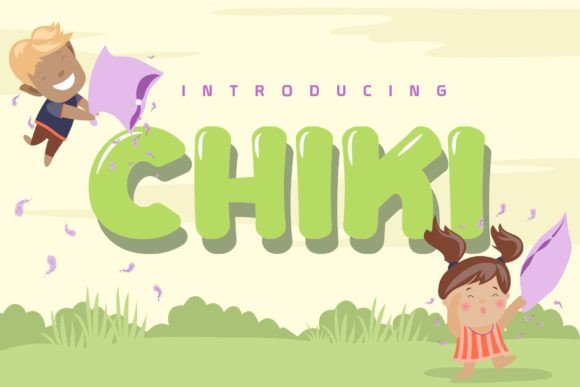
At its core, Chiki is a display font, meaning it is designed to be used at larger sizes for headlines, logos, and short bursts of text rather than long paragraphs of body copy. What sets Chiki apart from the thousands of other display fonts available is its unique balance. It doesn't lean too heavily into childish territory, nor is it overly rigid. Instead, it offers a fresh, contemporary aesthetic that feels energetic and approachable.
The letterforms in Chiki feature soft, rounded edges that suggest a friendly atmosphere. Unlike traditional block letters, Chiki incorporates subtle irregularities and stylistic curves that give it a hand-crafted feel. This "playfulness" is intentional. In the world of typography, a font's personality dictates the emotion of the design. Chiki conveys joy, creativity, and ease, making it an excellent tool for anyone looking to create a welcoming visual experience.
Why Crafters and Designers Love This Typeface
The versatility of Chiki is one of its strongest selling points. For crafters, particularly those involved in physical product creation, font compatibility is everything. Chiki works seamlessly with popular design software, specifically Silhouette Design Studio. This is crucial for users who utilize cutting machines to create decals, stickers, and apparel. Fonts that are too intricate often cause cutting blades to snag or overlap, ruining the material. Chiki’s design, while decorative, maintains enough structural integrity to cut cleanly on vinyl and cardstock.
For digital designers, compatibility with industry standards like Photoshop and Illustrator is non-negotiable. Chiki installs easily into your system font library, allowing you to access it within these programs instantly. Whether you are mocking up a website header or creating a social media graphic, the font renders crisply on screen. It allows designers to inject personality into a layout without needing to spend hours manually illustrating custom lettering.
Practical Applications for Modern Creators
Where exactly should you use a font like Chiki? The possibilities are vast, but the font shines brightest in specific contexts. Because it is a display typeface, it is best suited for projects where you want to grab attention quickly.
- Small Business Branding: If you run a bakery, a daycare, a pet grooming service, or a boutique clothing line, Chiki can help define your logo. Its friendly nature suggests that your business is approachable and customer-focused.
- Event Invitations: Planning a birthday party, baby shower, or casual wedding? Chiki adds a festive touch to invitations and RSVP cards that standard fonts simply cannot achieve.
- Merchandise and Apparel: T-shirt designers often look for fonts that look good printed on cotton. Chiki’s bold yet playful strokes make it legible on fabric, perfect for slogans, quotes, and graphic tees.
- Digital Content: Bloggers and content creators can use Chiki for YouTube thumbnails, Instagram stories, or Pinterest pins. It helps break the monotony of standard web fonts and can increase click-through rates by drawing the eye.
Integrating Chiki into Your Workflow
Getting started with Chiki is straightforward. Once you have downloaded the font file from Creative Fabrica, you simply need to install it on your operating system. For Windows users, this usually involves right-clicking the file and selecting "Install." Mac users can open the Font Book and drag the file in.
After installation, open your preferred design software. In Photoshop, for example, you will find Chiki listed in your font dropdown menu. It is important to experiment with the tracking (the space between letters) and leading (the space between lines) when using display fonts. Because Chiki has a distinct personality, tight kerning can make it look cramped, while too much spacing can make it lose its cohesive shape. Finding that "sweet spot" is part of the creative process.
Key Considerations Before You Design
While Chiki is an incredibly useful tool, it is not a one-size-fits-all solution. Understanding its limitations is just as important as knowing its strengths.
Legibility at Small Sizes: Because Chiki is designed for display purposes, it should generally not be used for body text (the main paragraph text in a document). If you shrink it down to 10 or 12 points, the playful details that make it beautiful at large sizes can become muddy and difficult to read. Always pair Chiki with a simpler, highly legible font for your supporting text.
Context Matters: While Chiki is modern, it may not fit every corporate environment. If you are designing a legal contract or a formal business proposal, Chiki would be out of place. However, for marketing materials, social media, and casual branding, it hits the mark perfectly.
Licensing and Usage: When acquiring fonts from platforms like Creative Fabrica, it is vital to understand the license. Kong Font Studio provides Chiki for personal and commercial use, but specific restrictions may apply depending on the subscription tier or purchase type. Always double-check the terms to ensure your project—whether it is a personal gift or a mass-produced product—complies with the usage rights.
The Value of Personality in Typography
In a digital landscape saturated with content, standing out is difficult. Generic fonts often lead to generic designs. By choosing a typeface like Chiki, you are making a conscious decision to inject warmth and character into your work. It demonstrates to your audience that you care about the details and that you are willing to move beyond the default settings.
For the hobbyist scrapbooker, Chiki can turn a simple photo album into a cherished keepsake. For the entrepreneur, it can turn a standard flyer into a compelling call to action. It is more than just a set of letters; it is a design asset that communicates a specific mood.
Final Thoughts on Choosing the Right Font
Selecting typography is a subjective process, but it should always be a thoughtful one. When you download Chiki, you are adding a versatile tool to your creative arsenal. It pairs well with simple sans-serifs and can handle a variety of colors and textures. Whether you are cutting vinyl decals in your home office or designing a billboard in Photoshop, Chiki offers a reliable way to make your text pop.
Ultimately, the best way to know if Chiki is right for you is to experiment. Load it up in Silhouette Design Studio, type out a few of your favorite phrases, and see how it feels. You might just find that this playful, modern display font is exactly the spark your next project needs.