Lovely: Crafting Whimsy and Artistry in Modern Design
In a digital landscape saturated with clean, minimalist sans-serifs and traditional serifs, there's a growing counter-movement. Designers and creators are increasingly seeking typefaces that inject personality, warmth, and a distinct human touch into their work. This is where the Lovely font family finds its relevance. It represents a category of playful, artistic typography that prioritizes emotional connection over rigid conformity. Far from being a niche novelty, this style of font is experiencing a resurgence, driven by the need for authentic branding, engaging educational materials, and personal creative projects that stand out.
The Rise of Expressive Typography
The evolution of design tools has democratized creativity. With powerful software accessible to everyone from freelancers to hobbyists, the barrier to creating professional-looking materials has lowered significantly. This accessibility has fueled a demand for diverse typographic resources. Where once a limited set of "safe" fonts dominated, creators now explore a vast spectrum to find the perfect voice for their project. Fonts like Lovely answer a specific need: to convey a sense of playfulness, artistry, and approachability. This aligns with broader trends in user experience and branding that favor authenticity and emotional resonance over cold, corporate uniformity.
Where Playful Fonts Find Their Purpose
The applications for a font with a whimsical or artistic feel are surprisingly broad, extending well beyond simple decoration. They are strategic choices for specific communication goals.
- Children's Education and Entertainment: This is a classic and enduring use case. Fonts like Lovely are instrumental in creating children's books, learning apps, and educational posters. Their often rounded, friendly shapes are easier for young readers to decipher, and their playful nature makes the reading experience enjoyable, fostering a positive association with literacy.
- Event and Personal Branding: For invitations, greeting cards, and personal blogs, a whimsical font sets an immediate tone. It communicates joy, celebration, and individuality. A wedding invitation using a script like Lovely feels more personal and crafted than one using a standard corporate font.
- Niche Marketing and Packaging: Small businesses, especially in artisanal food, boutique crafts, or lifestyle products, use expressive typography to differentiate themselves. It helps build a brand personality that is friendly, creative, and human, directly appealing to consumers looking for alternatives to mass-market goods.
- Digital Content and Social Media: On platforms like Instagram or Pinterest, where visual appeal is paramount, unique fonts help creators capture attention in a crowded feed. They can be used for quotes, headers, or promotional graphics to establish a distinct and recognizable aesthetic.
Navigating the Technical Landscape: A Practical Guide
Choosing a beautiful font is only the first step. Understanding its technical compatibility is crucial for a smooth workflow, especially when moving between digital design and physical production. This is a critical consideration for creators using cutting machines or various design software.
The Black Version: Versatility for Crafters
The standard black version of a font like Lovely is typically a workhorse file, usually in OTF or TTF format. Its broad compatibility makes it ideal for a wide range of applications. For users of Cricut Design Space and other cutting machines like Silhouette Cameo, the black version is essential. It functions as a standard outline font, allowing the machine to interpret the letter paths for cutting vinyl, paper, or other materials. This version is perfect for creating custom decals, labels, stencils, and apparel designs where a single-color silhouette is desired.
The Color Version: For Advanced Digital Projects
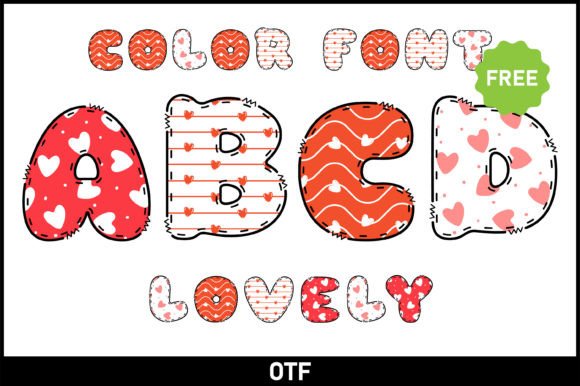
The color version of a font like Lovely is a more specialized tool. These files often use advanced OpenType features or layering techniques to display multiple colors, gradients, or textures within the letterforms. This creates a stunning, pre-designed effect that can elevate a digital project instantly.
However, this complexity comes with specific compatibility requirements. These color font files are not compatible with Cricut Design Space or similar cutting machine software. The machines cannot interpret the color data for cutting purposes. Instead, these files are designed for use in advanced graphic design programs that support these features:
- Adobe Photoshop
- Adobe Illustrator
- Silhouette Studio (Designer Edition or higher)
- Inkscape (with specific settings)
For creators, this means planning your workflow accordingly. Use the black version for any project intended for physical cutting. Reserve the vibrant color version for digital designs like social media graphics, website headers, or printed materials where you want that multi-color effect without manual layering.
Practical Implications for the Modern Creator
Integrating a font like Lovely into your toolkit is about more than just aesthetics; it's about strategic communication. Here’s how to think about it practically:
- Define the Project's Voice First: Ask what emotion or message you need to convey. If the answer is "joyful," "handcrafted," "childlike," or "whimsical," then a font in this category is a strong candidate. Don't use it for a legal document or a serious financial report, as it would undermine credibility.
- Consider Readability in Context: While artistic, these fonts must remain legible for their intended purpose. A highly decorative script might work for a single-word logo but fail as body text in a children's book. Test the font at the size and medium it will be used in.
- Pair with Simplicity: To avoid visual clutter, pair a playful display font like Lovely with a simple, clean sans-serif or serif for body text. This creates a balanced hierarchy that guides the reader's eye and maintains professionalism.
- Master the File Types: Always read the font provider's guide. Understanding the difference between OTF, TTF, and color font formats will save you hours of frustration. Bookmark resources like an "Ultimate Font Guide" for quick reference on compatibility and usage tips.
The demand for typography that feels personal and expressive isn't a fleeting trend. It reflects a deeper shift in how we communicate visually, valuing connection and character. By thoughtfully incorporating fonts like Lovely—understanding both their creative potential and their technical boundaries—creators, educators, and business owners can craft messages that don't just convey information, but also evoke the right feeling, making their work more memorable and impactful.